Testing & Quality
Unit, integration, and UI tests; test doubles; reliable coroutine tests; and keeping the test suite useful as an app grows.
All done - nice work.
Testing questions are usually practical. Interviewers want to know what you would test, where the test should run, and whether the result gives the team confidence without slowing development to a crawl.
A simple study path
Start with the starred questions: test scope, test doubles, ViewModel state, coroutines, Room, and UI behavior. Next learn how to control the network, WorkManager, navigation, and dependency injection. Treat screenshot, performance, migration, and CI strategy as follow-ups for experienced roles.
A reliable way to answer
For any “how would you test this?” prompt:
- Name the observable behavior, not the implementation call you expect.
- Pick the smallest scope that can prove it.
- Replace nondeterminism such as time, threads, network, IDs, and device state.
- Cover one success, one failure, and one boundary case.
- Explain which slower integration or device test is still necessary.
What gets tested
- Test scope: unit, integration, instrumented, UI, and end-to-end tests.
- Test doubles: fakes, mocks, stubs, and when each one helps.
- Android components: ViewModels, repositories, Room, and Compose UI.
- Asynchronous code: coroutine test dispatchers, virtual time, and Flow assertions.
- Boundaries: HTTP contracts, database migrations, WorkManager, navigation, and DI replacement.
- Reliability: removing sleeps, controlling dependencies, and diagnosing flaky tests.
- Quality signals: accessibility, visual regression, performance, CI feedback, and useful coverage.
How interviewers ask
Expect a feature or class and a simple prompt: “How would you test this?” Do not answer with a list of frameworks. Start with risk and behavior, then choose the scope and tools. Good candidates also identify what a unit test cannot prove.
Prep tip: explain one happy path, one failure path, and one edge case for a feature you built. Then say which tests you would not write and why.
Useful references
Frequently asked. Prioritize these in your first pass.
Start here
Core ideas you should be able to explain in plain language.
Testing foundations
What should an Android app's testing strategy look like?
The test pyramid guides where to invest: many fast tests at the bottom, few slow ones at the top.
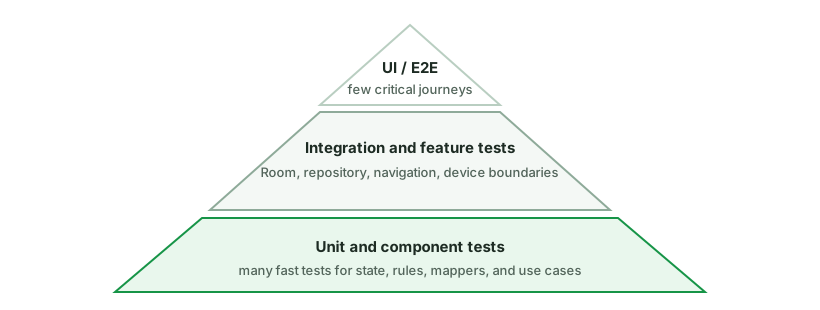
Unit tests (the base, most of your tests):
- Run on the JVM (no device) → fast, run on every change.
- Target pure logic: ViewModels, use cases, mappers, formatters, repositories (with fake data sources).
- Use
runTestfor coroutines, inject dispatchers, Turbine for flows.
Integration tests (middle):
- Verify components together: Room DAOs against an in-memory DB, a repository with real DB + fake network, navigation graphs.
- Some run on JVM (Robolectric) or instrumented.
UI / End-to-end (top, few):
- Espresso (Views) / Compose UI tests / UI Automator drive real screens and flows.
- Slow and flakier, so cover critical user journeys (login, checkout), not every screen.
Architecture for testability:
- Architecture enables testing - DI + interfaces let you inject fakes; UDF makes ViewModels pure functions of input you can assert on; separating layers keeps logic Android-free.
- Inject dispatchers and clocks so time/threading is controllable.
- Prefer fakes over heavy mocking, and test behavior, not implementation.
Other tools: screenshot tests (Paparazzi/Roborazzi) for visual regression, Macrobenchmark for performance, and Play Pre-launch reports for device coverage.
What is the difference between local and instrumented tests on Android?
Local tests run on the JVM on your development machine. They are fast and work well for business logic, mappers, reducers, and ViewModels whose Android dependencies have been kept behind interfaces.
Instrumented tests run on an Android device or emulator. Use them when the behavior depends on the framework, such as navigation, permissions, resources, Room integration, or a complete UI flow. They provide more realism but are slower and need more setup.
Robolectric sits between the two: it runs Android-like behavior on the JVM. It can be useful, but it is not a replacement for every device test.
A good default is to keep most tests local, add integration tests at important boundaries, and reserve device tests for behavior that genuinely requires Android.
When should you use JUnit, Robolectric, Espresso, Compose tests, or UI Automator?
Choose the smallest environment that can prove the behavior.
| Tool or environment | Best fit | What it does not prove |
|---|---|---|
| Local JUnit test | Pure Kotlin logic, reducers, ViewModels, use cases, mappers | Android framework and real-device behavior |
| Robolectric | Framework-dependent code that benefits from fast JVM execution | Every device, rendering, and platform integration detail |
| Compose UI test | Semantics, actions, state rendering, and Compose navigation flows | Visual pixel accuracy unless paired with screenshots |
| Espresso | View-based UI inside your app process | Interactions with other apps or system UI |
| UI Automator | Permissions, notifications, settings, app-to-app, and full device flows | Fast, isolated feedback |
This is not a ladder where every unit test must be repeated at every level. A date formatter needs a local test. A Room query needs a database integration test. A permission flow may require UI Automator because the permission dialog belongs to the system.
A healthy suite uses fast tests for most behavioral combinations and a smaller number of device tests for framework integration and critical journeys. If a test requires a device only because the production class directly creates an Android dependency, first ask whether the design can expose a smaller seam.
Use it in practice
Common implementation choices, debugging, and trade-offs.
Testing foundations
Fakes vs mocks vs stubs - which should you prefer and why?
All three are test doubles that stand in for real dependencies, but they differ:
- Stub - returns canned answers to calls (
whenever(repo.get()).thenReturn(data)). No real behavior. - Mock - a stub that also verifies interactions (“was
save()called once with X?”). Created with frameworks like MockK/Mockito. - Fake - a real, working lightweight implementation of the interface (e.g. an in-memory repository backed by a
MutableList/MutableStateFlow).
// Fake: a real, simple implementation
class FakeUserRepository : UserRepository {
    private val users = MutableStateFlow<List<User>>(emptyList())
    override fun observeUsers() = users.asStateFlow()
    override suspend fun add(user: User) { users.update { it + user } }
}
Prefer fakes (Google’s guidance) because:
- They test behavior, not implementation - you assert on the resulting state, not on “which methods were called.” Mocks couple tests to internal call sequences, so refactors break tests even when behavior is unchanged (“brittle tests”).
- A fake supports realistic flows (add then observe → emits the new list), which is exactly what
Flow-based code needs. Mocking aFlow’s emissions over time is painful and error-prone. - Fakes are reusable across many tests and read clearly.
When mocks are still useful:
- Verifying an interaction is the requirement - e.g. “analytics
track()was called,” “the repository’ssync()was invoked.” There’s no state to assert, so verifying the call is legitimate. - Simulating errors/edge cases that are awkward to build into a fake (a specific exception on the 3rd call).
- Quick isolation of a dependency you don’t want to implement.
Anti-pattern interviewers watch for: mock-heavy tests that mirror the implementation line-by-line - they pass even when the code is wrong and break on every refactor.
State and asynchronous code
How do you unit-test a ViewModel?
A ViewModel is testable precisely because it’s a function of injected dependencies and input events → emitted state. Inject a fake repository, drive events, assert on the emitted UiState.
class FeedViewModelTest {
    private val dispatcher = StandardTestDispatcher()

    @Before fun setup() { Dispatchers.setMain(dispatcher) }   // for viewModelScope
    @After  fun tearDown() { Dispatchers.resetMain() }

    @Test fun `loads feed successfully`() = runTest {
        val repo = FakeFeedRepository(items = listOf(post1, post2))
        val vm = FeedViewModel(repo)

        vm.state.test {                        // Turbine
            assertEquals(FeedUiState(loading = true), awaitItem())
            val loaded = awaitItem()
            assertEquals(listOf(post1, post2), loaded.items)
            assertFalse(loaded.loading)
        }
    }

    @Test fun `shows error when repo fails`() = runTest {
        val vm = FeedViewModel(FakeFeedRepository(error = IOException()))
        vm.refresh()
        advanceUntilIdle()
        assertNotNull(vm.state.value.errorMessage)
    }
}
The essentials:
Dispatchers.setMain(testDispatcher)in setup -viewModelScoperuns onDispatchers.Main, which doesn’t exist in unit tests; replace it. Reset in teardown.runTestgives a virtual clock (delays skipped) andadvanceUntilIdle()to flush coroutines.- Inject dispatchers into the ViewModel/repo rather than hardcoding
Dispatchers.IO, so tests are deterministic. - Fake, don’t hit real I/O - a
FakeRepositoryreturning canned data/errors. Prefer fakes over mocking frameworks for state. - Assert on emitted state with Turbine (
.test { awaitItem() }) or by collecting into a list. - Use
InstantTaskExecutorRuleif testingLiveData.
What to test: initial state, success path, error/empty paths, that events produce the right state transitions, and that one-off events are emitted.
Data and network boundaries
How would you test a repository that combines a network API and Room?
Test the repository as a unit by giving it controlled dependencies: a fake API, a fake or in-memory data source, and a test dispatcher. Verify behavior rather than implementation details.
Useful cases include:
- Cached data is returned while a refresh is in progress.
- A successful response is saved and then observed from the database.
- A network failure preserves usable cached data and exposes the right error.
- Repeated refreshes do not create duplicate rows.
- Cancellation stops work instead of being converted into a normal failure.
Add a smaller Room integration test with an in-memory database when queries, transactions, migrations, or conflict rules are important. There is usually no value in mocking every DAO call and then asserting that each mock was invoked. That only repeats the implementation in the test.
How do you test Room DAOs and database migrations?
DAO tests verify your real SQL, entities, converters, transactions, and conflict rules. Use an in-memory Room database on an Android device or emulator, give each test a fresh database, and close it afterward.
@RunWith(AndroidJUnit4::class)
class UserDaoTest {
    private lateinit var db: AppDatabase

    @Before fun createDb() {
        db = Room.inMemoryDatabaseBuilder(
            ApplicationProvider.getApplicationContext(),
            AppDatabase::class.java,
        ).build()
    }

    @After fun closeDb() = db.close()

    @Test fun activeUsers_areOrderedByName() = runTest {
        db.userDao().insertAll(zara, inactiveBen, ada)
        assertEquals(listOf(ada, zara), db.userDao().activeUsers().first())
    }
}
Test query behavior that can actually break: empty results, ordering, joins, nulls, uniqueness, replacement rules, transactions, and Flow invalidation. Do not mock a DAO when the purpose is to verify SQL.
Migration tests protect user data across app updates:
- Enable Room schema export and commit the schema JSON files.
- Use
MigrationTestHelperto create a database at an old version. - Insert representative old data, including nulls and boundary values.
- Run every migration to the latest version.
- Validate the final schema and assert that the data was preserved or transformed correctly.
Test each individual migration and the full path from every supported starting version. Schema validation alone is not enough when data must be backfilled, split, merged, or normalized. Never use destructive migration for user-owned data unless losing it is an explicit product decision.
How do you test an Android networking layer without calling a real backend?
Use two complementary test levels.
Unit-test policy and mapping with a fake API. This is where you cover retry decisions, DTO-to-domain mapping, cache behavior, and error classification.
Contract-test the HTTP client against a local server such as OkHttp
MockWebServer. It exercises the real Retrofit service, converter, headers,
interceptors, request body, and response parsing without depending on the
internet or a shared test environment.
@Test fun sendsCursorAndParsesNextPage() = runTest {
    server.enqueue(MockResponse().setBody(
        """{"items":[{"id":"42"}],"nextCursor":"abc"}"""
    ))

    val page = api.feed(cursor = "old")
    val request = server.takeRequest()

    assertEquals("/feed?cursor=old", request.path)
    assertEquals("42", page.items.single().id)
    assertEquals("abc", page.nextCursor)
}
High-value cases include malformed JSON, missing optional fields, unknown enum values, empty bodies, non-2xx errors, timeouts, cancellation, authentication headers, and error-body parsing. Keep JSON fixtures small and readable, and add a regression fixture whenever a real backend response breaks the app.
Mocks that return already-parsed DTOs cannot catch a wrong field name, converter configuration, or interceptor bug. A local HTTP test can. It still does not prove that the deployed backend honors the contract, so mature teams also validate an OpenAPI or GraphQL schema in CI and run a small number of staging smoke tests.
How do you test WorkManager and a CoroutineWorker?
Separate the worker’s business operation from WorkManager scheduling. A thin
CoroutineWorker should parse input, call an injected use case, and translate
the result to Result.success(), retry(), or failure(). Unit-test the use
case normally, then test the worker contract with work-testing.
class SyncWorker(
    appContext: Context,
    params: WorkerParameters,
    private val sync: SyncPendingChanges,
) : CoroutineWorker(appContext, params) {
    override suspend fun doWork(): Result = when (sync()) {
        SyncResult.Done -> Result.success()
        SyncResult.TransientFailure -> Result.retry()
        SyncResult.PermanentFailure -> Result.failure()
    }
}
Use TestListenableWorkerBuilder or the appropriate worker test builder to run
the implementation with controlled inputs and dependencies. Verify output data
and each result class. For scheduling integration, initialize WorkManager in
test mode with WorkManagerTestInitHelper and use its TestDriver to mark
constraints, initial delays, or periodic intervals as satisfied. Do not wait for
real time or network state.
Important cases include duplicate execution, cancellation, retryable versus permanent errors, input validation, backoff policy, unique-work behavior, and process restart. Workers may run more than once, so the underlying operation must be idempotent. A test that runs the same worker twice is often more valuable than another happy-path assertion.
UI and navigation
How do you test Compose UI?
Compose tests use a semantics tree (the same accessibility tree screen readers use), not view IDs. You find nodes, assert on them, and perform actions through a ComposeTestRule.
class CounterTest {
    @get:Rule val rule = createComposeRule()

    @Test fun increments() {
        rule.setContent { Counter() }

        rule.onNodeWithText("Count: 0").assertIsDisplayed()
        rule.onNodeWithContentDescription("Increment").performClick()
        rule.onNodeWithText("Count: 1").assertExists()
    }
}
The pieces:
- Finders -
onNodeWithText,onNodeWithTag(Modifier.testTag("...")),onNodeWithContentDescription,onAllNodes. - Assertions -
assertIsDisplayed,assertExists,assertIsEnabled,assertTextEquals. - Actions -
performClick,performTextInput,performScrollTo,performTouchInput. createComposeRulefor pure Compose;createAndroidComposeRule<Activity>()when you need a real Activity/host.
Synchronization: the test framework auto-syncs with recomposition and Compose-driven animations/coroutines - waitForIdle() happens implicitly between actions, so you rarely sleep. For non-Compose async, use waitUntil { }. You can disable auto-advance and control the clock with mainClock for animation tests.
Good practices:
- Add
testTagfor elements without stable text. - Test stateless composables by passing state directly - easy because they’re pure functions of inputs.
@Preview+ screenshot testing (Paparazzi / Roborazzi) catches visual regressions without a device.
Reliability and CI
What makes an Android test flaky, and how do you fix it?
A flaky test passes and fails without a relevant code change. Common causes are real time, uncontrolled dispatchers, shared state, network calls, animations, device differences, and assertions that run before the UI or background work is idle.
Start by reproducing the failure repeatedly and recording the seed, device, and logs. Then remove the uncontrolled dependency:
- Use virtual time for coroutines instead of
delayorThread.sleep. - Inject clocks, dispatchers, IDs, and external services.
- Reset databases, files, and singletons between tests.
- Use Compose or Espresso synchronization instead of fixed waits.
- Give each test its own data and avoid depending on execution order.
Retries may reduce CI noise, but they do not fix the test. Quarantine can be a short-term containment step only when the failure has an owner and a deadline.
Is code coverage a useful quality metric for Android tests?
Coverage answers which code executed, not whether the assertions proved the right behavior. A test can execute every line and assert nothing useful.
Use coverage as a diagnostic tool:
- Find important branches, error paths, and modules that receive no exercise.
- Review changed-code coverage when it helps identify an accidental blind spot.
- Set expectations by risk. Payment rules need stronger evidence than generated bindings or trivial model accessors.
- Exclude generated code deliberately and document why.
Avoid treating one repository-wide percentage as a target. It encourages tests for easy lines, discourages refactoring, and says little about database schemas, navigation graphs, resources, manifests, accessibility, or device behavior.
Branch coverage is often more informative than line coverage for state transitions and error handling. Mutation testing goes further by changing conditions or values and checking whether tests fail. Surviving mutations can reveal weak assertions, but mutation runs are expensive and should focus on critical pure logic.
A strong answer pairs modest coverage visibility with risk-based test design, escaped-defect analysis, flake rate, and feedback time. The goal is confidence and useful failures, not a decorative number.
Specialized quality tests
When are screenshot or golden tests useful, and how do you keep them stable?
Screenshot tests render a component or screen and compare the pixels with an approved baseline. They catch visual regressions that semantics assertions miss: spacing, clipping, colors, typography, icon alignment, and unexpected wrapping.
They are most useful for a design system and a deliberate state matrix:
- Light and dark themes.
- Small and large font scales.
- Loading, empty, error, and populated states.
- Long text, right-to-left layout, and representative screen sizes.
- Components whose appearance is part of the public design contract.
Host-side tools can render quickly in CI, while device screenshots provide more platform fidelity at greater cost. Whichever tool you choose, pin fonts, locale, density, theme, animation state, clock, and random data. Compare only after the UI is idle.
Do not record a baseline automatically after every failure. A human should review the diff and decide whether it is an intentional design change. Store baselines in version control or a reviewable artifact system, and make the CI failure show expected, actual, and difference images.
Screenshot tests complement semantics tests. They can prove that a button looks right, but not that it has an accessible role, can be clicked, or triggers the correct behavior.
How do you test Android accessibility instead of relying only on manual checks?
Accessibility needs automated checks, focused interaction tests, and manual assistive-technology testing. No single layer catches everything.
Automated checks: enable Accessibility Test Framework checks in View-based tests where appropriate, run Android lint, and inspect Compose semantics. Catch missing labels, tiny touch targets, duplicate descriptions, low contrast, and invalid traversal relationships early.
UI behavior tests: find controls by role, label, text, or content description rather than visual coordinates. Assert important semantics such as selected, disabled, heading, state description, and custom actions. Test large font scale, right-to-left layout, keyboard or switch navigation, and dynamic announcements.
Manual checks: complete critical flows with TalkBack and keyboard or switch access. Check focus order, whether focus is lost after navigation or updates, whether errors are announced, and whether gestures have accessible alternatives.
Use testTag for test plumbing only when no user-facing semantic exists. A test
that can find a button only through a private tag may pass while a screen reader
cannot identify it.
Include accessibility in component APIs and design-system tests. It is much cheaper to make one shared button correct than to repair the same issue across every feature.
Optional deep dives
Internals and broader design questions to study after the core material.
State and asynchronous code
How do you test coroutines and flows?
Optional deep dive: This is useful after you are comfortable with the everyday version of the topic. Focus on the main idea first; the implementation details are a senior-level follow-up.
The toolkit from kotlinx-coroutines-test:
runTest { } - the entry point for coroutine tests. It runs on a virtual clock, so delay(10_000) completes instantly (time is skipped, not waited). It also auto-waits for child coroutines.
@Test
fun loadsData() = runTest {
    val vm = MyViewModel(fakeRepo)
    vm.load()
    advanceUntilIdle()                 // run all pending coroutines
    assertEquals(Expected, vm.state.value)
}
Test dispatchers:
StandardTestDispatcher- coroutines are queued, not run eagerly; you drive them withadvanceUntilIdle()/advanceTimeBy(). Good for controlling ordering.UnconfinedTestDispatcher- runs coroutines eagerly to their first suspension. Simpler when you don’t care about precise scheduling.
Injecting the dispatcher is the key design point: don’t hardcode Dispatchers.IO - inject a dispatcher so tests can swap in a test one.
class Repo(private val io: CoroutineDispatcher = Dispatchers.IO) {
    suspend fun load() = withContext(io) { /* ... */ }
}
Replacing Dispatchers.Main (for viewModelScope): in setup call Dispatchers.setMain(testDispatcher), and Dispatchers.resetMain() in teardown.
Testing flows - collect manually, or use Turbine for ergonomic assertions:
viewModel.state.test {           // Turbine
    assertEquals(Loading, awaitItem())
    assertEquals(Loaded(data), awaitItem())
    cancelAndIgnoreRemainingEvents()
}
Data and network boundaries
How do you replace Hilt dependencies in Android tests?
Optional deep dive: This is useful after you are comfortable with the everyday version of the topic. Focus on the main idea first; the implementation details are a senior-level follow-up.
Use the production graph for wiring, but replace external boundaries with deterministic test implementations.
For Hilt instrumented tests:
- Annotate the test with
@HiltAndroidTest. - Add
HiltAndroidRuleand callinject()after any rule that prepares the Activity or Compose host. - Use the Hilt test application configured by the test runner.
- Replace a production module with
@TestInstallInwhen the fake should be shared by many tests. - Use
@UninstallModulesfor a one-off replacement, or@BindValuefor a fake owned by one test class.
@Module
@TestInstallIn(
    components = [SingletonComponent::class],
    replaces = [NetworkModule::class],
)
object FakeNetworkModule {
    @Provides @Singleton
    fun api(): UserApi = FakeUserApi()
}
Replace the narrowest boundary that gives the test control. A UI integration test may use the real ViewModel, repository, Room database, and navigation while replacing only the remote API and clock. Replacing every class with a mock proves very little about the graph.
Watch scope and state leakage. A singleton fake is shared for the component’s lifetime, so reset it between tests or provide a fresh graph. Also keep local ViewModel and use-case tests independent of Hilt. DI-framework tests are useful for graph integration, not for every branch of business logic.
UI and navigation
How do you test configuration changes and process-death restoration?
Optional deep dive: This is useful after you are comfortable with the everyday version of the topic. Focus on the main idea first; the implementation details are a senior-level follow-up.
Rotation and process death are different failures and need different tests.
Configuration change: ActivityScenario.recreate() or host recreation can
verify that the ViewModel survives, the UI is rebuilt, collectors do not
duplicate, and transient UI state behaves as intended. This does not simulate
process death because the same process and retained state can remain available.
Saveable Compose state: StateRestorationTester can emulate saving and
restoring the hierarchy around a composable. Verify values backed by
rememberSaveable and custom Saver implementations.
ViewModel restoration: construct the ViewModel with a SavedStateHandle,
drive changes, capture the keys that are meant to survive, then create a new
ViewModel from restored values. Keep the saved data small and serializable.
Real process recreation: for a critical flow, use an instrumented or device-level test that backgrounds the app, kills its process, and relaunches through the supported entry point. Assert from user-visible state or durable storage, not from object identity.
Test the product contract:
- Navigation identity, query text, or draft ID is restored.
- Durable edits come back from Room or another persistent source.
- Loading work is restarted safely and does not duplicate a submission.
- One-time events are not replayed merely because the screen was rebuilt.
- Sensitive or excessively large objects are not placed in saved state.
The key interview distinction is that a ViewModel handles configuration
changes, SavedStateHandle handles small restorable state, and persistent
storage handles durable user data.
Reliability and CI
How would you scale Android tests in CI for a large multi-module app?
Optional deep dive: This is useful after you are comfortable with the everyday version of the topic. Focus on the main idea first; the implementation details are a senior-level follow-up.
Optimize for fast, trustworthy feedback first, then broader confidence.
On every pull request: run formatting, static analysis, compilation, and local tests for affected modules. Add component or feature tests for changed boundaries. Cache dependencies and build outputs carefully, and shard large test sets using historical timing rather than file count.
Before merge: run a small emulator matrix and critical feature flows. Use a known device image, disable animations where the test does not cover them, keep fixtures isolated, and publish logs, screenshots, video, and test reports on failure.
After merge or nightly: run application journeys, migration tests, broader API levels and form factors, accessibility checks, screenshots, and performance benchmarks. Reserve the widest device-farm matrix for release candidates.
Track suite health as a product:
- Median and tail feedback time.
- Failure and flake rate by test and owner.
- Quarantined tests with an owner and expiry date.
- Regressions escaped by each test layer.
- Slowest modules and journeys.
Retries can expose whether a failure is flaky, but a green retry must not erase the signal. Fix or quarantine the test with a deadline. Avoid a single giant end-to-end stage that blocks every change for an hour. A test suite that teams stop trusting has almost no protective value.
Specialized quality tests
How do you test startup, scrolling, and other Android performance regressions?
Optional deep dive: This is useful after you are comfortable with the everyday version of the topic. Focus on the main idea first; the implementation details are a senior-level follow-up.
Performance tests need a measurable user journey, a stable environment, and a release-like build. Timing a debug build inside a unit test is not useful.
Use Macrobenchmark from a separate test module for whole-app journeys such as cold startup, opening a heavy screen, or scrolling a feed. Measure startup timing, frame timing, and traces while driving the app as a user would. Test cold, warm, or hot startup deliberately rather than mixing them.
Use Microbenchmark for a small hot code path such as parsing, layout logic,
or a data transformation. It handles warmup and repeated measurement more
carefully than measureTimeMillis.
Good practice:
- Benchmark a release or benchmark build that is optimized and profileable.
- Use a controlled physical device when results gate releases. Emulators are useful for functional smoke tests but add noisy timing.
- Stabilize data, network responses, animations, thermal state, and background work as far as possible.
- Run enough iterations and compare distributions, not one number.
- Save traces so a regression can be diagnosed, not merely reported.
- Set thresholds from an established baseline and account for normal variance.
Baseline Profiles are an optimization, not the measurement itself. Generate or ship them for critical journeys, then use Macrobenchmark to verify their effect. CI can run a smaller regression set regularly, while broader device coverage runs nightly or before release. Production Android vitals and field telemetry remain necessary because a lab cannot represent every device.
Discussion
Comments are powered by GitHub Discussions. Sign in with GitHub to join in.